 James
James
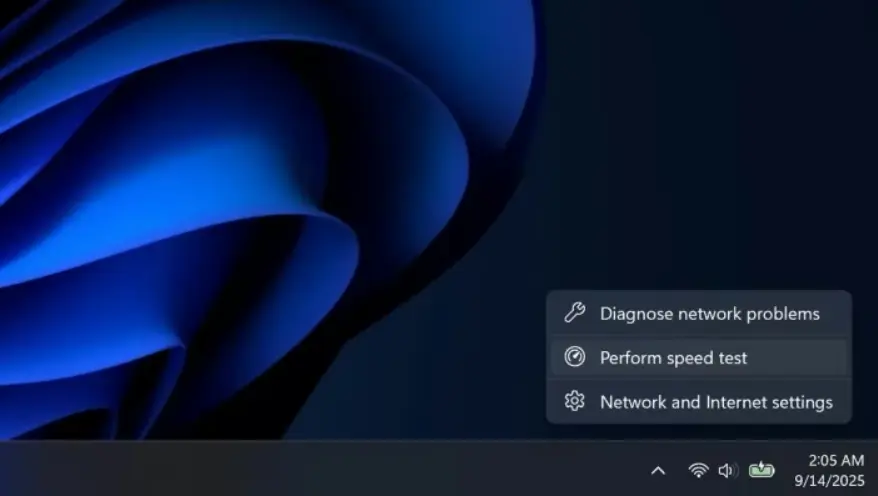
Windows 11 internet speed test is becoming a built-in feature, as Microsoft prepares to integrate a native speed testing tool directly into the operating system. With this update, users will no longer need to search for third-party websites to check their internet connection speed. Instead, Windows 11 will allow quick access to a speed test directly from the taskbar.
Microsoft has started rolling out this new feature to Windows 11 Insider users via the Release Preview channel. The goal is to make basic network diagnostics faster, easier, and more accessible for everyday users.
How the Windows 11 Internet Speed Test Works
The new Windows 11 internet speed test can be accessed by right-clicking the network icon in the system tray on the taskbar. Users can also reach it through Wi-Fi, Ethernet, or mobile data settings.
Once the test is launched, the speed measurement opens in the default web browser. It quickly analyzes download speed, upload speed, and connection performance, allowing users to understand their internet quality within seconds.
This feature supports:
- Ethernet connections
- Wi-Fi networks
- Mobile or cellular data
Microsoft first began testing this idea last year, but it has now reached a more stable preview stage.
Why This Feature Matters
For many users, checking internet speed has always required visiting external websites or installing extra software. By integrating the Windows 11 internet speed test into the operating system, Microsoft removes unnecessary steps and improves the overall user experience.
This is especially useful for:
- Remote workers
- Online gamers
- Streamers
- Users troubleshooting slow connections
Having quick access to speed data helps users instantly decide whether the issue lies with their network or another system component.
More New Features Arriving with Windows 11 Updates
The latest Release Preview builds, 24H2 (Build 26100) and 25H2 (Build 26200), introduce more than just the speed test.
Notable improvements include:
- Smarter taskbar behavior for apps with multiple open windows
- Local Sysmon support for advanced monitoring
- Camera pan and tilt controls
- Improved Start Menu layout options
- Bug fixes for File Explorer and system components
In addition, users will see:
- New emoji designs
- A full-screen Widgets settings menu
- Support for setting WEBP images as desktop wallpapers
These updates show Microsoft’s continued focus on both functionality and visual polish.
When Will the Feature Be Available to Everyone?
Currently, the Windows 11 internet speed test is only available to users in the Release Preview channel. If testing goes smoothly, Microsoft is expected to roll out the feature to all Windows 11 users in a future stable update.
This gradual rollout helps ensure reliability before a global release.
Final Thoughts
The built-in Windows 11 internet speed test may seem like a small change, but it solves a common daily problem. By bringing essential network tools directly into the operating system, Microsoft makes Windows 11 more practical and user-friendly.
As Windows 11 continues to evolve, features like this show that Microsoft is listening to real user needs and focusing on convenience as much as performance.


